


Hi, I’m Hannah! Welcome to Nonlinear News, where I write for ambitious people choosing the nonlinear path.
🤖 VIBE CODE NIGHT (May 20 @ 6-8:30pm in NYC)
I’m hosting an in-person vibe coding night this week! Over 200 people signed up for my event but we only had space for 50 (barely), so I’m making this a regular thing. Introducing…
5-9 Builders Club
Date/Time: Wed May 20, 6-8:30pm
Location: NYC (RSVP for exact location)
»» SIGN UP HERE «« (I only have a few spots left - make sure you follow me on IG stories or follow the 5-9 builders club event page so you’re the first to see future events)
Can’t wait to meet a lot of you and build together!
A few weeks ago, I started building a system I’m calling my AI Second Brain. It’s slowly but definitively transformed how I work and given me hours back across both my 9-5 and my 5-9.
I’ve shared pieces of this on Instagram and LinkedIn but I know not everyone catches everything. I wish I’d done this intentionally three months ago, so if this is the nudge you need to do the same, I’ll be happy to have shared it in detail here!
The problem: your AI sounds like AI when it doesn’t know you
AI generates slop when it doesn’t have context. Over the past year, I’d gotten increasingly frustrated with AI because I felt like I kept having to prompt it the same things, upload the same files, and keep re-explaining that I hate the “not x, not y, but z” AI slop cadence that you see in the worst LinkedIn thought leadership posts ever.
The solution: a second brain that gives your AI context that it can keep building on
What I mean by “second brain” is a folder of markdown files (a fancy kind of text file) on my desktop that any AI agent on my computer can read, that tells it:
who I am
how I sound and write
what I’m working on at my 9-5 and at my 5-9
what rules to follow
what skills it knows
That way, when I open a new chat with any AI agent that’s connected to it (ChatGPT Codex, Claude, Perplexity, for example), it doesn’t ask me who I am, what I sound like, or what I’m working on. It already knows.
I built this for my 5-9 after watching my team in my 9-5 do this for the past few weeks, and seeing the dramatic impact it had on making everyone’s AI outputs better.
You can start this in just 45 minutes. The point isn’t building the most sophisticated AI-pilled system out the gate in that time, but rather, having an MVP you can keep improving. The longer you wait, the more daunting it feels and the more you think you have to build before you start. (same goes for building anything new!)
The benefits of having a second brain:
It works with any AI you use. A second brain is a folder of markdown files. It doesn’t care which agent you point at it. If you’re mostly seeing Claude content on Instagram, it’s because there are so many Claude tutorials being made there.
**Don’t get locked in, because LLMs are surpassing each other all the time. Lately, I’ve found GPT-5.5 on Codex better and cheaper in token consumption than Claude, which I’d been using up to now.Drafts come back 90% ready, not 30%. When I ask for a LinkedIn post or a newsletter based on my voice notes, my AI already knows my positioning, who my audience is, that I never use empty phrases I hate like “That matters” or “quietly”. I’m editing the last 10% instead of prompt-engineering and context dumping my way to the first 90%.
No crossover between your lanes. Your AI stops putting personal context into work emails or work jargon into brand pitches. You can route context to specific tasks.
It grows and improves every week. Every new project, decision, or skill file you add makes the next output sharper. After a month, your second brain is denser than anything a fresh chat could replicate, no matter how many files you upload.
What’s in my second brain
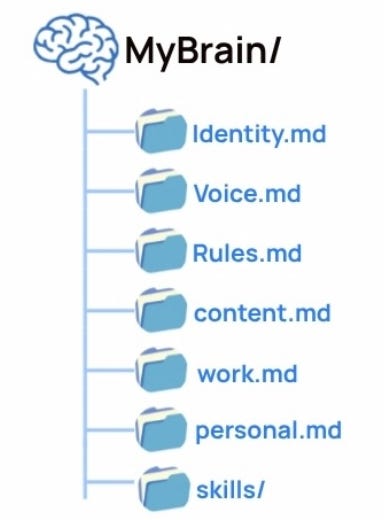
The basic setup is simple and similar across other guides on this you’ll see. At the top level, I have 3 core files:
IDENTITY.md: Who I am, what I do, what I’m building, what I care about.
VOICE.md: How I sound, words I use, words I avoid, sentence patterns, tone, examples of my best writing.
RULES.md: The routing layer that tells the AI which files to read for which task.
Then I split my life into lanes, with each one being housed in one folder:
/work for my 9-5 context
/content for my creator business
/personal for values, habits, lifestyle context, and anything else that shouldn’t get mixed into work outputs
/skills for repeatable tasks
A skill is a markdown file that teaches AI how I do one task. I have skills for things like writing a LinkedIn post, drafting a newsletter, reviewing a brand deal contract, writing a carousel, and humanizing AI drafts so they stop sounding like generic slop.
Instead of prompting from scratch, I can say roughly what I want, and the agent knows which process to follow.
Real example: how I use this system
For this newsletter, for example, I gave Codex posts I wanted to repurpose as a longer guide and sent a long voice note on what I wanted to say in the post. Then it read my newsletter skill, which tells it exactly how to write like me, dozens of my past newsletter samples, which include edit logs that show what I’ve historically cut from AI drafts.

That’s a very different starting point from opening a blank chat and saying, “write this in my voice” and pasting a long prompt.
Of course, I still go through every draft, but it cuts the time I spend writing my weekly newsletter from hours to ~30 minutes.
5 steps to build your second brain
»Here’s the full guide. «
The basic steps look like this, but you don’t have to pay too much attention because the guide includes prompts you can paste into your agent to ask it to guide you on all of these steps.
Create the folder and the empty files. Three top-level files (IDENTITY.md, VOICE.md, RULES.md) plus the lane subfolders. Empty .md files are fine. The next step fills them.
Run the starter prompt. The prompt in the guide interviews you with a few questions per file and writes your first version in about 30 minutes. You’ll edit and add to it as you go.
Add skills as you notice them. Any task you do more than two or three times is a skill candidate. Capture how you do it once, and you’ve taught your AI to do it for you forever.
Wire up RULES.md so it routes correctly. Be specific. Something like: “for newsletter writing, read /content + /skills/newsletter, not /work.” This is what keeps the system feeling intentional instead of a pile of context.
Run a 15-minute weekly ritual. Block time every Sunday to update what changed: a new project at work, a new positioning idea for content, a task you did three times this week that should become its own skill. Without this, the brain goes stale fast. With it, it gets denser every week.
What I’ve added since the first version
Three things that have made mine better since creating my v1:
Moved the folders from my desktop to GitHub. Once your brain is doing real work, you don’t want it living on one laptop. A private repo gives you version history, a backup, and sync across machines. It also makes you less scared to make big edits, because you can always roll back. If you don’t know what this means or how to do it, ask Chat after you have your second brain and it will show you how!
Let my AI write its own skills. When I find myself prompting the same task three times in a row, I ask my AI to write the skill file for that task itself. The brain grows itself.
Weekly audits. Old context gets in the way of new context. My guide includes a prompt you can give your agent to update the brain itself on a weekly basis.
Further reading and more perspectives on building a second brain
Needless to say, especially if you spend time on X, there are hundreds of people who have started building context for their AI months (probably even years) before me, and mine feels like the tip of the iceberg in comparison!
Here are a few resources I’ve learned from along the way.
Ruben Hassid on AI workflows for creators and operators - his Substack has a lot of great guides and it’s where I started
Tiago Forte who first coined “second brain”
Andrej Karpathy on context engineering and “Software 2.0”
X has the deepest and latest versions of this conversation. Instagram and LinkedIn are downstream of it. If you’re serious about building a second brain, start following people who talk about building in AI there. These 3 are great people to start with, and you’ll be down the rabbit hole yourself in no time.
one last thing…think of AI as your team
The best way I like to think about building my AI second brain is like creating a big Notion space for a team, with all the context that new employees coming in need to know in order to succeed in their roles.
You wouldn’t expect a new editor or EA to do good work on day one without context. You’d give them a doc. You’d tell them how you sound, what you care about, what’s off limits. AI works the same way. It just doesn’t ask for the doc, so most people never write one!
If you’re frustrated with how some people on the internet are talking about AI transforming their work and businesses while you’re still prompting for hours to get the right output, take time this week to start building this. 45 minutes of setup will give you back hundreds of hours over the next year.
If you build one, reply and tell me if it’s helped and how you’re structuring yours. I love seeing how people adapt this and learning together!
» If you scrolled to the bottom, here’s the full guide again! You can copy paste this directly into your agent!«


Interesting jobs from my network that caught my eye
Strategic Consultant – Applied Intuition (AI/Auto, Late Stage, Sunnyvale)
Portfolio Services Partner – a16z New Media (Media/VC, Late Stage, NY)
Director, Global Markets Operations – Chief of Staff – Visa (Fintech, Public, SF)
Strategy & Operations – TLDR (Media/Newsletter, Growth Stage)
Founding GTM, US – Rexi (AI/Fintech, Pre-Seed, NY)
Entrepreneur, CEO Office – Handshake (Career Tech/AI, Late Stage, SF)
Open role – Stepful (HealthTech/EdTech, Growth Stage, NY)
Thank you, Hannah. You are brilliant
The link to the full guide doesn't seem to work.